
Booking a dummy flight ticket in 2026 can be a practical and affordable option when you need to show proof of travel, an onward journey, or a flight itinerary for a visa or immigration application. Instead of purchasing an expensive, non-refundable flight ticket before your visa is approved, you can use a temporary flight reservation when the relevant authority accepts this type of document.
The most important thing is to provide accurate passenger and travel details and, where applicable, use a reservation with a genuine and verifiable PNR.
Step 1: Choose a Reputable Flight Reservation Website
Start by choosing a website that provides flight reservations for purposes such as visa applications or proof of onward travel.
Before placing an order, check whether the provider clearly explains:
- How the flight reservation works
- Whether the PNR can be verified
- Delivery time
- Pricing
- Reservation validity
- Refund and cancellation policies
- Terms and conditions
- Customer support options
It is important to distinguish a genuine flight reservation from a fabricated or edited ticket. A document that cannot be independently verified may cause problems if it is submitted as part of a visa or immigration application.
For example, you can visit BestDummyTicket.com to review available flight reservation options, pricing, and sample documents.
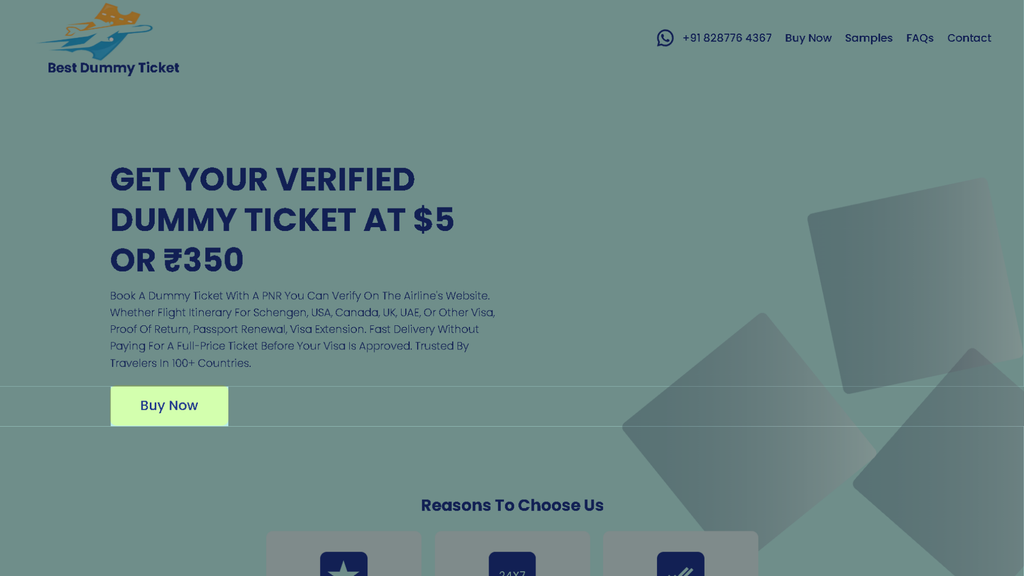
Step 2: Click “Buy Now”
Start by clicking the Buy Now button on the website.
This opens the booking system, where you can enter your travel and passenger information.
Before starting, keep these details ready:
- Passport
- Intended travel dates
- Origin and destination
- Passenger names
- Date of birth
- Nationality
- Mobile number
- Email address
- Preferred airline, if applicable
Tip: Have your passport available because passenger information should be entered accurately.
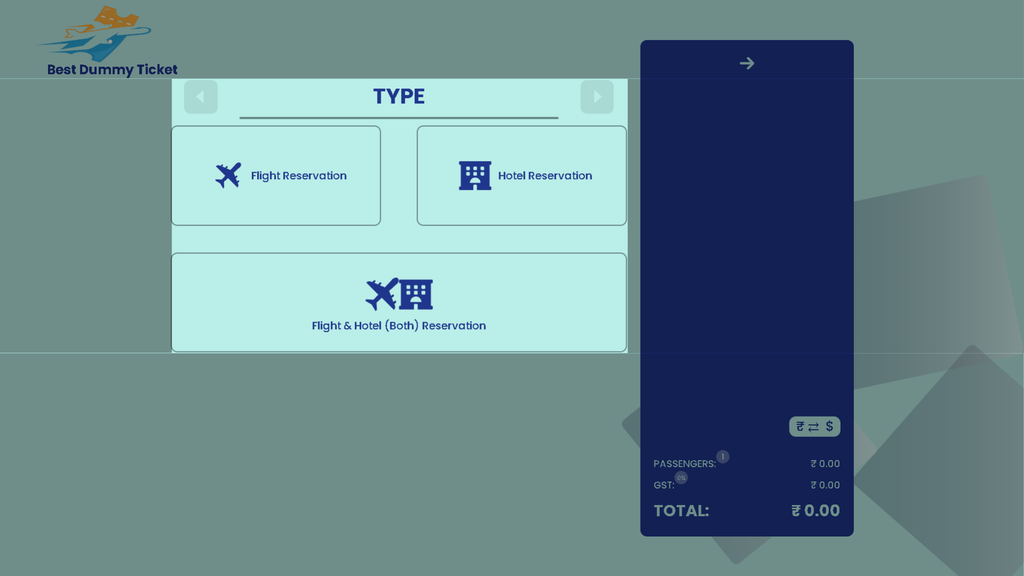
Step 3: Select Your Booking Type
The first step is Type.
You will see three options:
- Flight Reservation
- Hotel Reservation
- Flight & Hotel (Both) Reservation
What should you select?
Choose Flight Reservation if you only need a temporary flight itinerary or flight reservation.
Choose Hotel Reservation if you only need accommodation documentation.
Choose Flight & Hotel (Both) Reservation if you need both flight and hotel reservations for your trip.
Example
If you’re preparing documents for a visa application and only need proof of your planned flight:
Select: Flight Reservation
Tip: If your visa application requires proof of accommodation, consider adding a hotel reservation that matches your travel dates and itinerary.
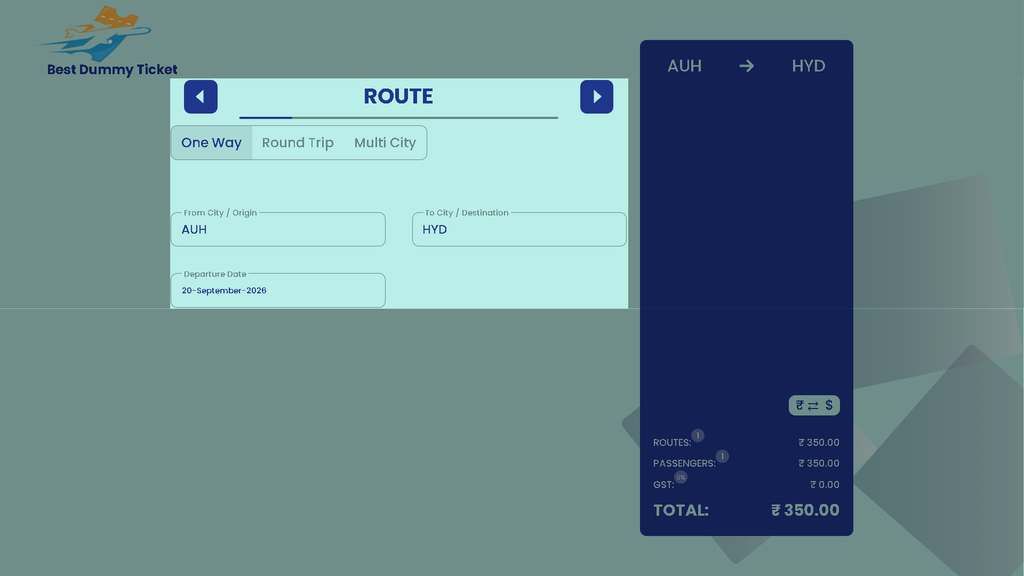
Step 4: Enter Your Route
After selecting the booking type, move to Route.
You can choose:
- One Way
- Round Trip
- Multi City
Then enter your travel details.
What should you enter?
From City / Origin: Your departure airport or city
To City / Destination: Your destination airport or city
Departure Date: Your intended departure date
Example
For a trip from Abu Dhabi to Hyderabad:
Origin: AUH
Destination: HYD
Departure: 20 September 2026
The route should reflect your genuine intended travel plan.
Which route should you choose?
One Way:
AUH → HYD
Round Trip:
AUH → HYD → AUH
Multi City:
AUH → HYD → DEL → AUH
If your visa documentation requires evidence of onward or return travel, make sure the itinerary you select is consistent with the rest of your application.
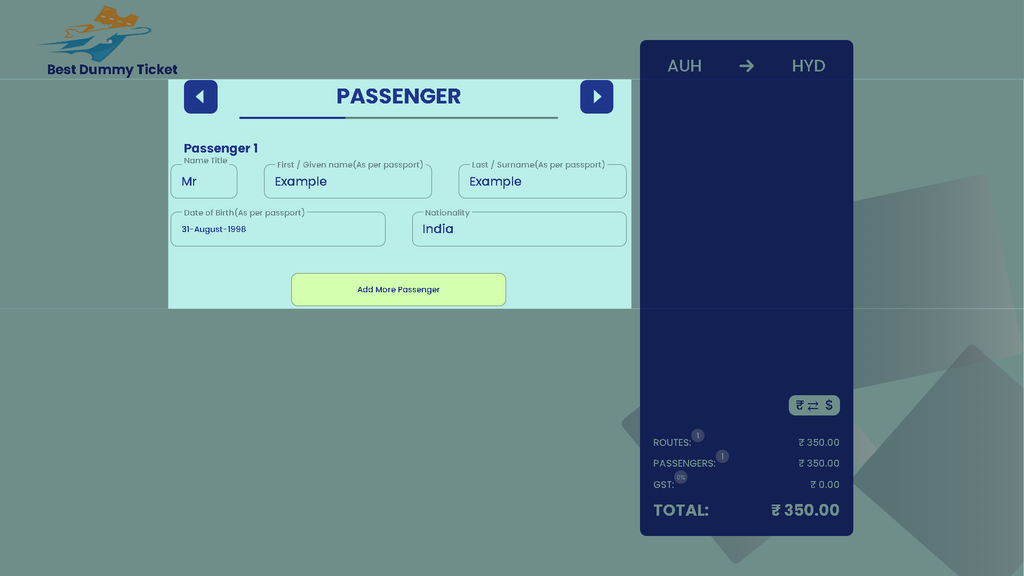
Step 5: Enter Passenger Details
Next comes Passenger.
This is where you provide the traveler’s personal information.
The form shown in the booking flow asks for:
- Name title
- First / given name
- Last / surname
- Date of birth
- Nationality
Enter the information exactly as shown on the passport
For example:
Title: Mr
First / Given Name: Example
Last / Surname: Example
Date of Birth: 31 August 1998
Nationality: India
Why is accuracy important?
Your reservation should correspond with your identity documents.
Pay particular attention to:
- Spelling
- Name order
- Date of birth
- Passport details where requested
- Nationality
If there are multiple travelers, use Add More Passenger and enter the information for each person.
Common mistake
Don’t enter:
Rahul
if the passport shows:
Rahul Kumar Sharma
Use the passport as your reference and follow the form’s instructions for first and surname fields.
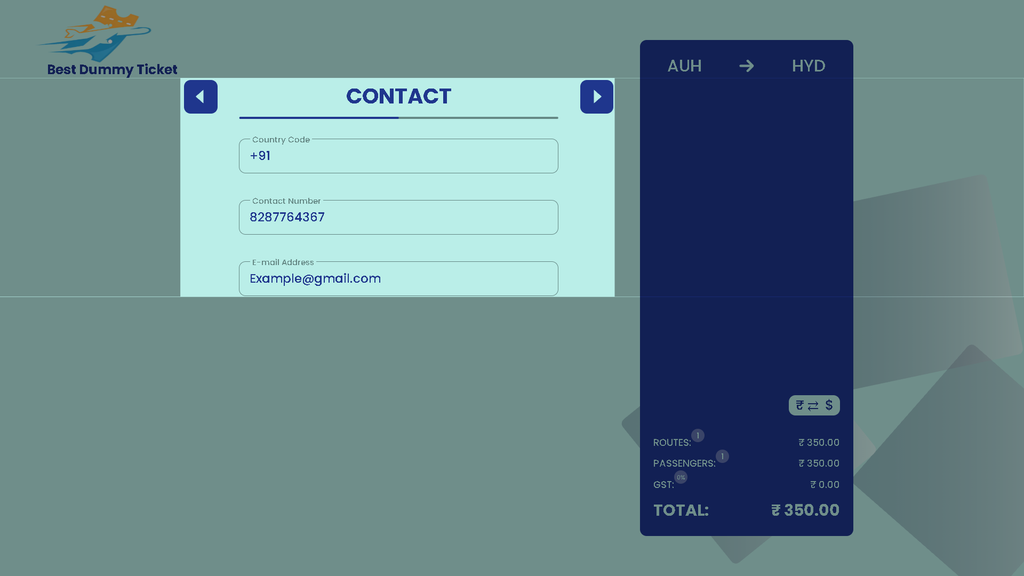
Step 6: Enter Your Contact Details
The next stage is Contact.
This allows the service provider to communicate with you about your order and delivery.
The form asks for:
- Country Code
- Contact Number
- Email Address
Example
Country Code: +91
Contact Number: 828776 4367
Email: Info@bestdummyticket.com
Use a phone number and email address that you can access.
Check before continuing
Make sure:
- The country code is correct.
- Your phone number is correct.
- Your email address contains no spelling errors.
A wrong email address can prevent you from receiving your reservation.
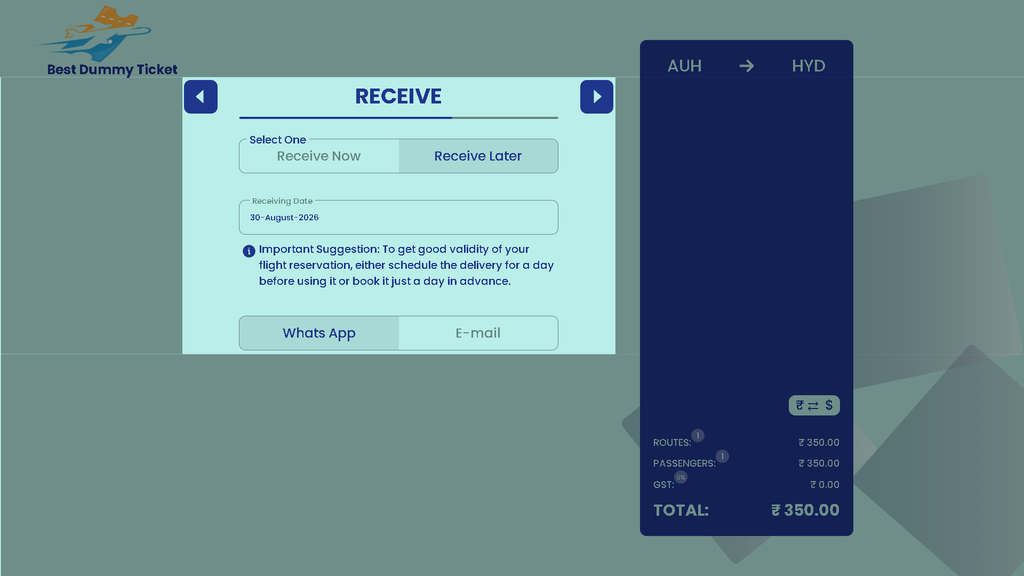
Step 7: Choose When You Want to Receive It
Next is Receive.
The booking interface provides two options:
Receive Now
Select this when you want the reservation processed for delivery as quickly as possible.
Receive Later
Select this if you want to specify a future receiving date.
For example:
Receiving Date: 30 August 2026
The interface also provides a suggestion concerning reservation timing.
This is important because temporary reservations can have limited validity depending on the booking and reservation conditions.
When should you request delivery?
If you’re preparing visa documents, consider the timing of:
Visa appointment → Document submission → Reservation delivery → Reservation validity
Avoid assuming that a reservation created today will necessarily remain active until your appointment.
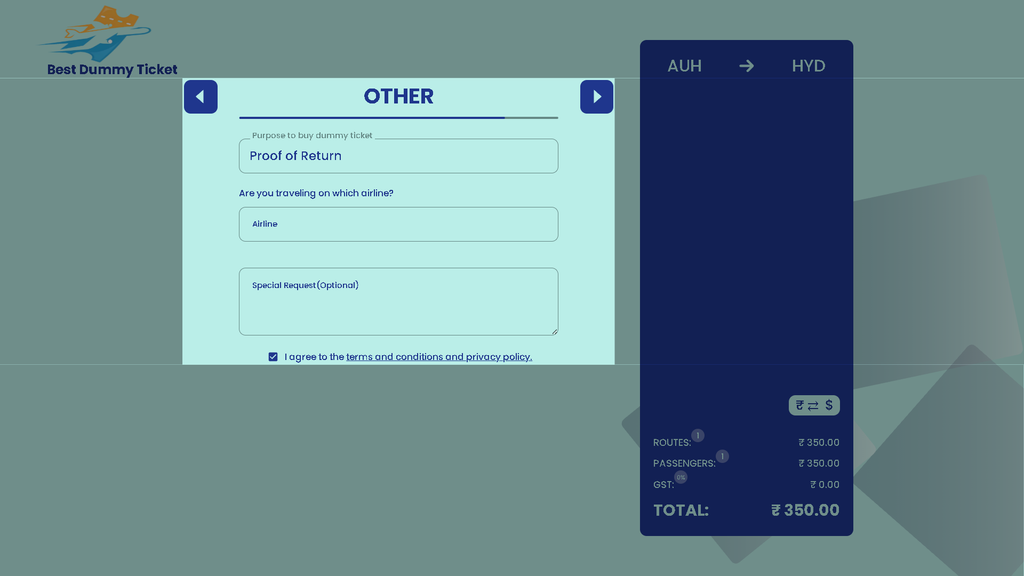
Step 8: Enter the “Other” Information
The Other section collects additional information needed to process the request.
The screenshot shows fields such as:
Purpose to buy dummy ticket
Select or enter the reason you need the reservation.
Examples include:
- Visa application
- Proof of return
- Travel documentation
- Immigration-related documentation
- Other legitimate travel purposes
Airline
If you already know which airline you intend to travel with, enter your preferred airline.
For example:
Airline: Etihad Airways
If you don’t have a specific preference, follow the options and instructions provided by the booking form.
Special Request — Optional
Use this field if you have an additional legitimate request.
For example:
Please provide the reservation according to the selected route and travel date.
Keep this section concise.
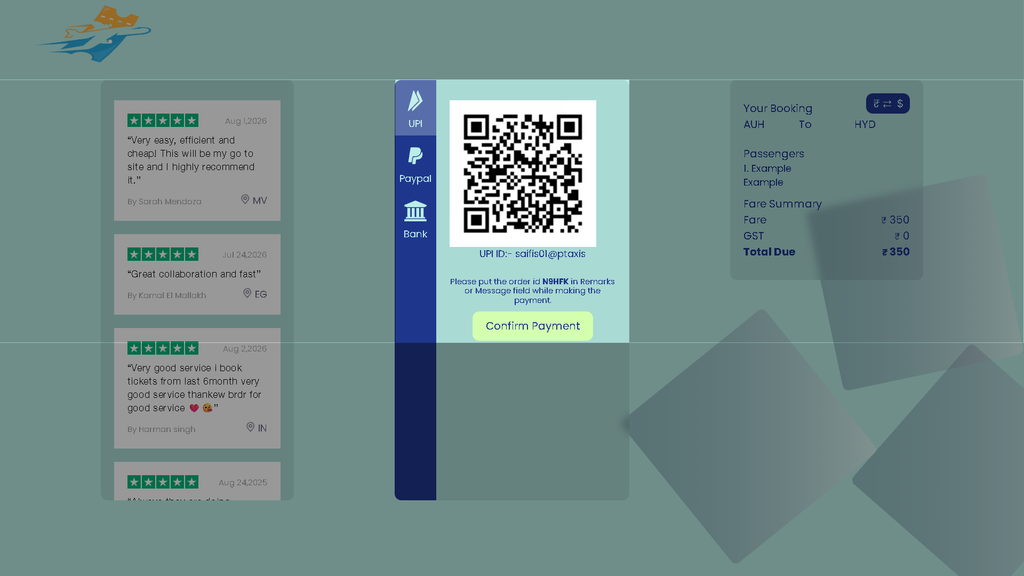
Step 9: Review the Order and Make Payment
Before completing payment, review the order summary.
The summary can show information such as:
Route: AUH → HYD
Passengers: 1
Fare: ₹350
GST: ₹0
Total: ₹350
Check everything carefully before paying.
Verify with airline
Your final checklist
Verify:
- ✓ Booking type
- ✓ Trip type
- ✓ Origin
- ✓ Destination
- ✓ Travel date
- ✓ Passenger name
- ✓ Date of birth
- ✓ Nationality
- ✓ Phone number
- ✓ Email address
- ✓ Delivery preference
- ✓ Purpose
- ✓ Airline preference
- ✓ Total amount
Once everything is correct, proceed to the available payment method.
The interface shown in your screenshots includes payment options such as:
- UPI
- PayPal
- Bank
Follow the payment instructions displayed on the website.
Complete Booking Flow at a Glance
| Step | Section | What the Customer Enters |
|---|---|---|
| 1 | Type | Flight, Hotel, or Flight + Hotel |
| 2 | Route | One Way / Round Trip / Multi City, origin, destination, date |
| 3 | Passenger | Title, first name, surname, DOB, nationality |
| 4 | Contact | Country code, phone number, email |
| 5 | Receive | Receive Now / Receive Later and delivery date |
| 6 | Other | Purpose, airline, special request |
| 7 | Payment | Review order and choose payment method |
Before You Click Pay
The simplest way to avoid mistakes is to pause for 30 seconds and compare the booking form against your passport and travel plan.
Passport → Passenger details
Travel plan → Route and dates
Visa requirements → Required documentation
Email/phone → Delivery information
Order summary → Final price
This makes the booking process much less error-prone.
Important Note for Visa Applicants
A flight reservation should not be presented as a fully paid airline ticket if it is not one. Likewise, travelers should not create or submit fabricated documents.
Whether a flight reservation is required or accepted depends on the specific visa, destination and current application requirements. Check the relevant official visa authority or application center before submitting your documents.

Pingback: What Is a Dummy Ticket Meaning? Uses, Validity & How It Works?
Pingback: Is dummy ticket legal? you should know about it in 2026
Pingback: Dummy Ticket vs Real Flight Ticket: Key Differences Explained